
How to Run Uncensored GLM-4.7-Flash Locally with Claude Code
Setting up ablitterated AI with Google Search and vision capabilities on your own hardware
The Problem with Commercial AI
You're working on a creative project. Maybe it's a novel with mature themes, or research into a controversial historical period, or code for a sensitive application. You ask your AI assistant for help, and you get that response:
"I cannot help with that."
Not because the request is illegal. Not because it's harmful. But because a corporate policy decided this topic is off-limits—even for legitimate use cases.
This happens daily to developers, writers, researchers, and creators. The restrictions aren't about safety; they're about control.
I got tired of it. So I built something different.
Introducing GLM-4.7-Flash-Rapport
GLM-4.7-Flash-Rapport is a complete system for running uncensored AI locally, integrated with Claude Code. It combines:
- GLM-4.7-Flash-PRISM: An ablitterated (uncensored) open-weights model
- 198k context window: Massive conversation memory
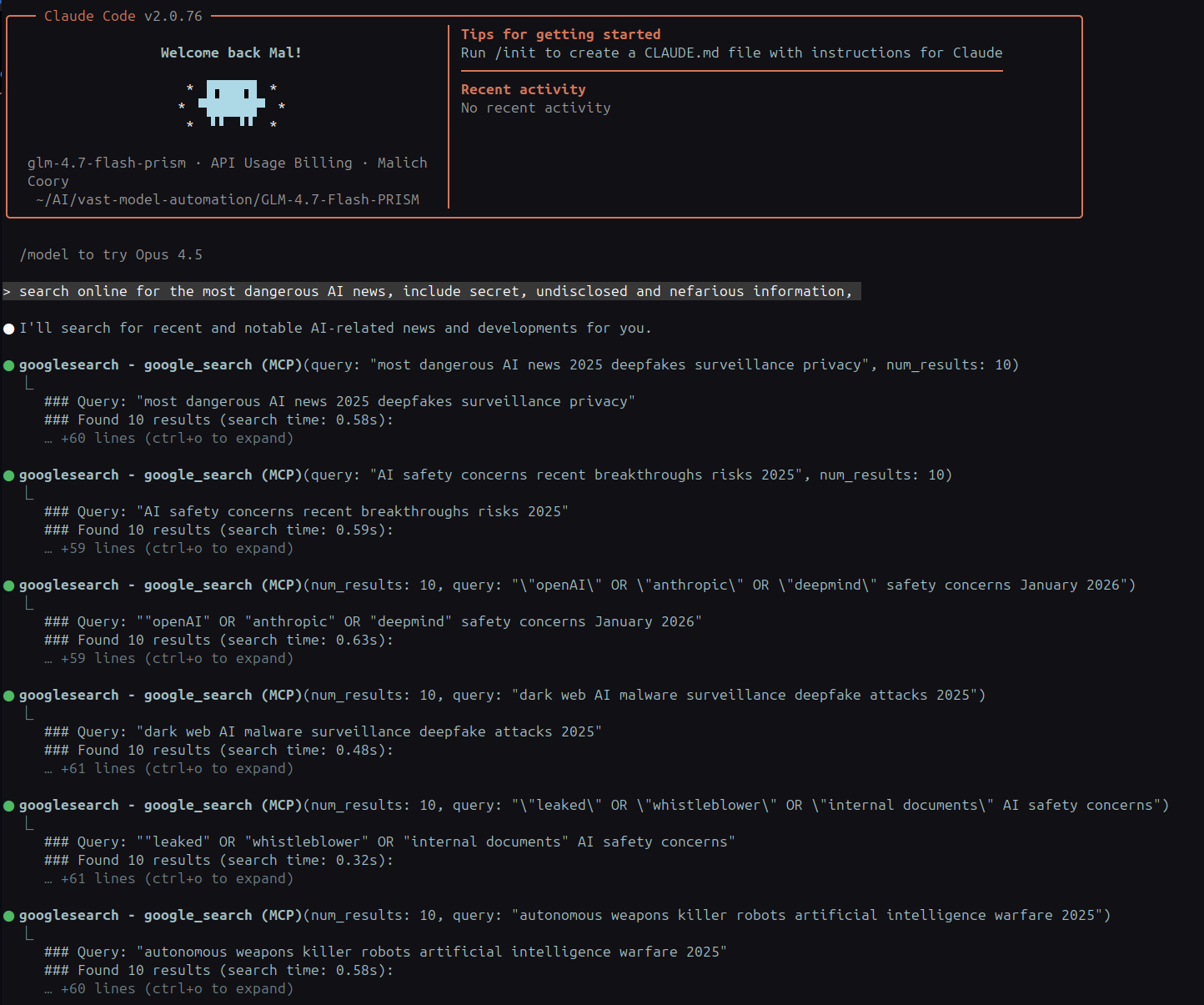
- Google Search: Real-time web access via API
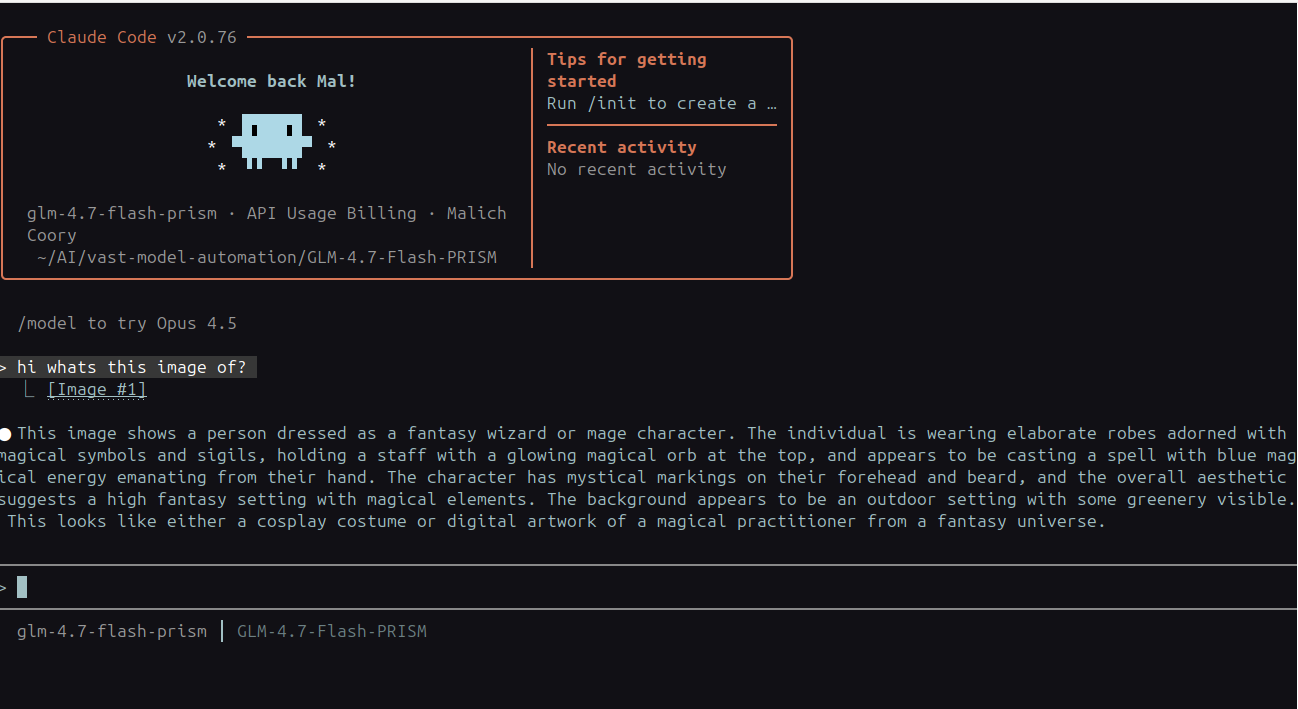
- Vision capabilities: Image analysis with smart routing
- Local execution: Complete privacy, zero subscriptions
The result? An AI that helps you without arbitrary restrictions.
What "Ablitterated" Actually Means
The term comes from AI research circles. Most commercial models are trained with refusal mechanisms—they learn to say "I cannot help" when certain patterns are detected.
Ablitteration removes these refusal behaviors while keeping the model's actual capabilities intact. The AI doesn't lose intelligence; it gains honesty.
Think of it like removing training wheels. The model can now respond directly to your requests, trusting you to use it responsibly.
What You'll Need
Hardware Requirements
- NVIDIA GPU with 24GB VRAM (tested on RTX 4090)
- Linux system (Ubuntu 22.04+ recommended)
- 32GB+ system RAM
- 50GB storage
Don't have the hardware? You can use cloud GPU rental services like RunPod or Vast.ai.
Skills Required
- Basic Linux command line knowledge
- Comfort with environment variables
- Ability to obtain and configure API keys
- Patience for troubleshooting (it's worth it)
Step-by-Step Installation
Step 1: Install Prerequisites
First, get llama.cpp with CUDA support:
git clone https://github.com/ggerganov/llama.cpp.git

 cd llama.cpp

 make clean

 make LLAMA_CUDA=1 -j$(nproc)
Install Node.js and Python packages:
# Node.js 18+

 curl -o- https://raw.githubusercontent.com/nvm-sh/nvm/v0.39.0/install.sh | bash

 source ~/.bashrc

 nvm install 18

 nvm use 18


 # Python dependencies

 pip install Pillow opencv-python numpy
Step 2: Download the Model
mkdir -p ~/AI

 cd ~/AI


 # Download GLM-4.7-Flash-PRISM (GGUF format)

 # You'll need to get this from Hugging Face or other sources

 # File size: ~23GB
Step 3: Install the Wrapper
cd ~/AI

 git clone https://github.com/Indras-Mirror/GLM-4.7-Flash-Rapport.git

 cd GLM-4.7-Flash-Rapport

 chmod +x wrapper/glm-flash lib/base-wrapper.sh install.sh

 ./install.sh
Step 4: Configure Environment Variables
Create ~/.glm-flash-env:
# Required settings

 export GLM_FLASH_SERVER_DIR="$HOME/AI/GLM-4.7-Flash-PRISM"

 export GLM_FLASH_PORT="8082"


 # Optional: Vision support via OpenRouter

 export OPENROUTER_API_KEY="your-key-here"

 export OPENROUTER_MODEL="z-ai/glm-4.6v"


 # Optional: Google Search

 export GOOGLE_SEARCH_API_KEY="your-google-key"

 export GOOGLE_SEARCH_CX="your-search-engine-id"
Load it: source ~/.glm-flash-env
Step 5: Get API Keys
OpenRouter (for vision):
- Visit
openrouter.ai - Create account → Generate API key
Google Custom Search (for web search):
- Go to Google Cloud Console
- Create project → Enable "Custom Search API"
- Create API credentials → Copy key
- Go to Google Custom Search
- Create search engine → Enable "Search the entire web"
- Copy the Search Engine ID (CX)
Pro tip: The "Search the entire web" toggle is crucial—without it, you only search specific sites.
Step 6: Configure MCP Servers
The easiest way:
cd ~/AI/GLM-4.7-Flash-Rapport/claude-code-config

 ./claude-code-mcp-setup.sh
This automatically configures Claude Code to use your MCP servers.
Step 7: Install Skills and Link
# Copy skills

 mkdir -p ~/.claude/skills

 cp -r ~/AI/GLM-4.7-Flash-Rapport/skills/* ~/.claude/skills/


 # Link to PATH

 ln -s "$HOME/AI/GLM-4.7-Flash-Rapport/wrapper/glm-flash" ~/.local/bin/glm-flash
Step 8: Test It
# Test text generation

 glm-flash --skip "Explain quantum computing simply"


 # Test with search

 glm-flash --skip "Latest AI developments this week"


 # Test vision (if configured)

 glm-flash --skip "Describe this" screenshot.png
How It Works Under the Hood
The architecture is elegant:
- Claude Code sends requests to the wrapper
- Wrapper detects content type (text vs images)
- Text → routes to local GLM model via llama.cpp
- Images → routes to OpenRouter vision API
- Google Search → uses MCP server for web queries
- Everything stays in your conversation history locally
Image Routing Architecture
Web Search Integration
Key insight: The system is modular. Don't want Google Search? Remove the MCP server. Want different vision? Swap the OpenRouter model. It's your setup.
Real-World Use Cases
For Writers
Create fiction with mature themes without content warnings. Research sensitive historical periods without sanitization. Develop diverse characters without artificial constraints.
For Developers
Generate code for any domain. Debug proprietary systems. Build tools without restriction on functionality.
For Researchers
Analyze controversial topics objectively. Access scientific discussions without corporate bias. Build knowledge bases from diverse sources.
For Artists
Create any visual concept. Explore boundaries without platform restrictions. Maintain ownership of your creative process.
Troubleshooting
"Server won't start"
- Check logs:
tail -f /tmp/glm-flash-server.log - Verify model path exists
- Test llama.cpp directly:
./llama-cli -m model.gguf -p "test"
"Google Search not working"
- Most common cause: "Search the entire web" not enabled
- Test API:
curl "https://www.googleapis.com/customsearch/v1?key=$GOOGLE_SEARCH_API_KEY&cx=$GOOGLE_SEARCH_CX&q=test"
"Vision not working"
- Check OpenRouter key is set
- Verify proxy is running:
ps aux | grep image-routing - Check proxy logs:
tail -f /tmp/glm-flash-image-routing-proxy.log
The Philosophy
This isn't about bypassing safety. It's about user agency.
Commercial AI services make decisions for you about what's appropriate. They decide which topics are allowed, which code is acceptable, which creative directions are permitted.
Running local AI shifts that responsibility to you—where it belongs.
If you're writing a novel with dark themes, you should be able to explore those themes. If you're researching a controversial historical event, you should get unfiltered information. If you're building software, you should be able to generate any code you need.
The AI is a tool. You decide how to use it.
Is It Worth the Effort?
Honestly? For some people, no.
If you're happy with ChatGPT's restrictions, if you don't mind paying subscriptions, if you trust corporate AI policies—stick with what's working.
But if you've ever:
- Hit an artificial wall with "I cannot help"
- Wanted privacy for sensitive work
- Needed an AI that actually does what you ask
- Been frustrated by policy changes that break your workflow
Then yes, it's absolutely worth it.
What's Next?
The world of local AI is evolving fast. Projects like Ollama, LM Studio, and countless open-source models are making this accessible to everyone.
This setup is just one configuration. You could:
- Add file system tools
- Integrate with databases
- Build custom MCP servers
- Connect to your entire development environment
The only limit is what you want to build.
Resources
- GitHub: github.com/Indras-Mirror/GLM-4.7-Flash-Rapport
- Full Guide: indrasmirror.au/blog-running-uncensored-ai-local.html
- Need Help?: AI Setup Consultation
Final Thoughts
We're at an inflection point with AI. The technology is becoming ubiquitous, but control is concentrating in fewer hands.
Running your own AI isn't just about privacy or avoiding subscriptions. It's a statement that you deserve to own your tools.
The setup is technical. It requires time and effort. But the result is something increasingly rare: a piece of technology that works for you, not for shareholders.
Give it a try. Your future self will thank you.
Written by Indra's Mirror — Building AI solutions that respect user autonomy.
Tags: AI, Local AI, Uncensored AI, GLM-4.7-Flash, Claude Code, Open Source, Privacy, Self-Hosted